Bank of America statement to Excel, checked to the cent.
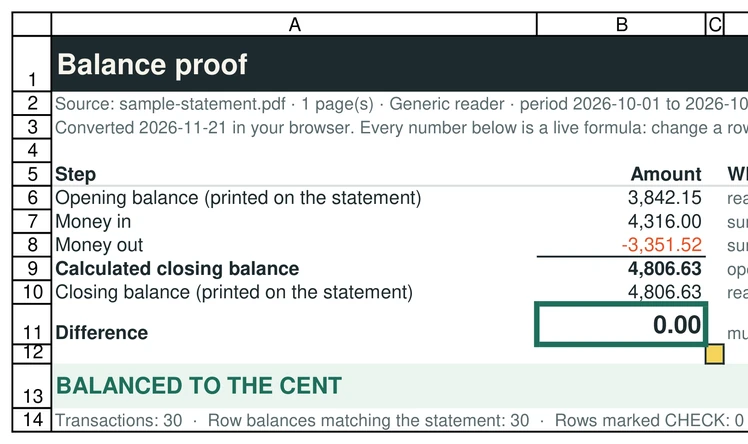
Drop a Bank of America checking or savings statement. You get a spreadsheet with a Proof tab that adds every transaction to the opening balance and compares it with the closing balance on your statement. Read in your browser, never uploaded.
Drop your Bank of America statement PDF
Checking or savings statement, downloaded from online banking
Several months? Select them together: you also get a month-to-month check.
OFX, the QuickBooks CSV and the Xero CSV are for accounting software that imports bank files, and are offered only when the statement balances to the cent. We test-imported the OFX and the QuickBooks CSV into GnuCash (free accounting software): every row, date, sign and the closing balance came out as on the statement. The QuickBooks CSV follows Intuit's published three-column layout (Date, Description, Amount); the Xero CSV has the columns Xero's help page describes (Date, Amount, Description, Cheque number; money out negative; no balances). GnuCash is not QuickBooks or Xero, we have not tried those two, and the Xero CSV has not been imported into Xero by us.
Tested in Microsoft Excel for Windows and Google Sheets (Excel for the web: not tested yet).
One workbook: a Chain proof sheet (live formulas: each month balances, and closing = next opening) and every transaction in one table.
Chase, Bank of America, Wells Fargo and TD Bank: tested on synthetic statements in their layouts and on the sample statements Wells Fargo and TD Bank publish, not yet on customer statements. U.S. Bank and Citi: no official sample exists that we could find, so they use the generic reader. Every file shows whether it balanced. How we test
Download your Bank of America statement as a PDF
Sign in to Online Banking or the Bank of America app.
Open the account and choose Statements & Documents.
Select the statement and download it as a PDF.
Menu names change from time to time. Look for "Statements". Use the monthly PDF statement: it includes the opening and closing balances the proof needs.
What SheetProof reads on a Bank of America statement
- The sections Deposits and other additions, Withdrawals and other subtractions, Checks and Service fees, merged into one list in date order.
- Checks printed two or three per line are split into one row each.
- The Beginning balance and Ending balance from the account summary. The Daily ledger balances table is skipped, so balances are never counted as transactions.
Tested on synthetic statements modelled on public descriptions of the Bank of America layout (fictional data; we have never seen a customer statement and never will, so a real statement can differ). If your file does not balance, the tool tells you and marks the row.
Bank of America statement to CSV
Want a CSV for a budgeting app or a spreadsheet? After the conversion, click Download CSV. Columns: Date (YYYY-MM-DD), Description, Amount (negative for money out), Running balance and Balance on statement. Map Date, Description and Amount when you import. For QuickBooks Online use CSV for QuickBooks instead.
The Proof tab only exists in the Excel file: CSV has no tabs. Check the verdict on this page before you import.
If it doesn't balance
You'll see the amount it's off by and the first row where the running balance stops matching the balance Bank of America printed. That usually means a line was missed or misread. The Excel file marks the row CHECK so you can compare it with the PDF in seconds.
Bank of America statement questions
How do I download my Bank of America statement as a PDF?
1. Sign in to Online Banking or the Bank of America app. 2. Open the account and choose Statements & Documents. 3. Select the statement and download it as a PDF. Menu names change from time to time: look for "Statements". Use the monthly PDF statement, not a screenshot or a print of the transaction list.
How do I convert a Bank of America statement to Excel?
Download the statement as a PDF from Bank of America online banking, drop it on this page and click "Download Excel (.xlsx)". The file has a Transactions tab and a Proof tab that checks the balance.
Can I convert a Bank of America statement to CSV?
Yes. After the conversion click "Download CSV". It has Date, Description, Amount, Running balance and Balance on statement columns.
Does it work with Bank of America credit card statements?
Not yet. SheetProof Convert reads checking and savings statements for now. If you drop a credit card statement, the tool tells you.
Is my Bank of America statement uploaded?
No. It is read by your browser on your device. Only anonymous events such as "a conversion happened" are counted, never the file or its numbers.
Can I convert several months?
Yes. Select the PDFs together (up to 12): you get one workbook with a Chain proof sheet that checks every month on its own and checks that each month opens where the last one closed, so a month missing in between shows. Or convert them one at a time: each file gets its own Proof tab.
Is SheetProof affiliated with Bank of America?
No. Bank of America is a trademark of Bank of America, N.A.. SheetProof is an independent tool.
Other banks
Synthetic layout testedWells FargoWells Fargo statement to Excel & CSV
Synthetic layout testedU.S. BankU.S. Bank statement to Excel & CSV
Layout not confirmed · proof still appliesCitiCiti statement to Excel & CSV
Layout not confirmed · proof still appliesTD BankTD Bank statement to Excel & CSV
Tested on a published samplePNCPNC statement to Excel & CSV
Generic reader · betaNavy FederalNavy Federal statement to Excel & CSV
Generic reader · betaCapital OneCapital One statement to Excel & CSV
Generic reader · betaHSBCHSBC statement to Excel & CSV
Generic reader · beta
Compare SheetProof Convert with DocuClipper and Bank Statement Converter