Bank statement PDF to Excel, checked to the cent.
Your PDF is read in your browser, never uploaded. Every file comes with a Proof tab: live Excel formulas that show the balance adds up, so you or your accountant can re-check it.
Drop your statement PDF
Chase, Bank of America, Wells Fargo, TD Bank and other banks (generic reader)
Several months? Select them together: you also get a month-to-month check.
OFX, the QuickBooks CSV and the Xero CSV are for accounting software that imports bank files, and are offered only when the statement balances to the cent. We test-imported the OFX and the QuickBooks CSV into GnuCash (free accounting software): every row, date, sign and the closing balance came out as on the statement. The QuickBooks CSV follows Intuit's published three-column layout (Date, Description, Amount); the Xero CSV has the columns Xero's help page describes (Date, Amount, Description, Cheque number; money out negative; no balances). GnuCash is not QuickBooks or Xero, we have not tried those two, and the Xero CSV has not been imported into Xero by us.
Tested in Microsoft Excel for Windows and Google Sheets (Excel for the web: not tested yet).
One workbook: a Chain proof sheet (live formulas: each month balances, and closing = next opening) and every transaction in one table.
Chase, Bank of America, Wells Fargo and TD Bank: tested on synthetic statements in their layouts and on the sample statements Wells Fargo and TD Bank publish, not yet on customer statements. U.S. Bank and Citi: no official sample exists that we could find, so they use the generic reader. Every file shows whether it balanced. How we test
Don't trust the converter. Check the file.
A converter can drop a line and still hand you a tidy spreadsheet. SheetProof adds every row back up against the balances your bank printed, and tells you when they don't match.
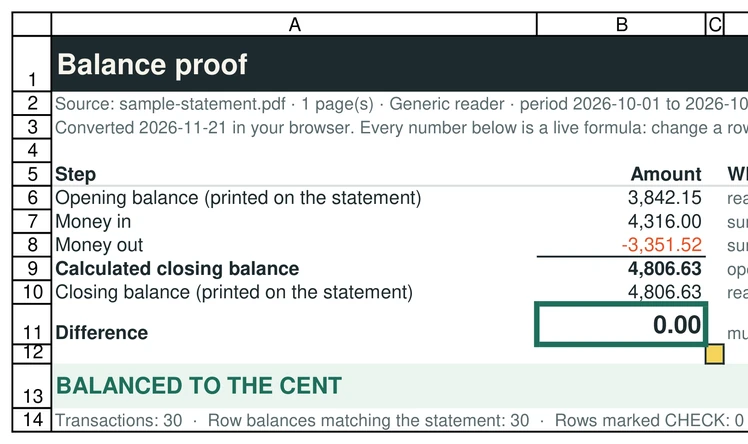
$3,842.15 + 30 rows = $4,806.63
Opening balance plus every transaction equals the closing balance printed on the statement, and all 30 row balances match.
First problem: row 12, 10/10/2026
We deleted one line from the PDF on purpose. The converter names the amount and the row, and the Excel file marks it CHECK.
Difference = calculated − printed closing = 0.00
The Proof tab is made of live formulas, not a picture of a result. Edit a row and the proof updates. Your accountant can check it without trusting us.
How we testTested on sample statements published by banks and public bodies
Fictional data, downloaded from the publishers' own websites. 7 of 15 balance to the cent, 1 more adds up but its PDF has no closing-balance line (the tool says "consistent, with one limit"). The other 7 are flagged as not balancing instead of guessed: guides with printing errors of their own, a handout with an amount drawn on the wrong line, a first page whose closing balance needs the next page, and samples that are cut-off excerpts or have text printed over the amounts. Only a few of these are full statements, so read this as "never called balanced when it is not", not as a score.
| Published by | What the converter said |
|---|---|
| Wells Fargo sample statement on wellsfargo.com (older layout) | Balanced to the cent · 22 rows |
| TD Bank sample checking statement in TD Bank Financial Education, Grades 9-12 Lesson 2 (td.com) | Balanced to the cent · 12 rows |
| Centris Federal Credit Union statement guide on centrisfcu.org | Balanced to the cent · 6 rows, 6 row balances checked |
| FDIC Money Smart sample checking statement (ct.gov copy) | Consistent, with one limit: 3 rows add up to the last balance printed on the rows, but the PDF has no closing-balance line, so a missing last row would not show |
| MSGCU credit union statement guide on msgcu.org | Does not balance: off by $0.04. Found that the guide's own printed balance on row 2 is 26 cents off (1,385.26 − 100.00 = 1,285.26, printed 1,285.00) |
| City of Saint Paul bank statement handout on stpaul.gov | Does not balance: off by $25.15. One amount is drawn on the wrong line of the graphic; the tool says so instead of guessing |
| Five-Star Bank e-statement sample, Premier Checking (five-starbank.com) | Does not balance: off by $171.61. The bank prints only the first page of five: all 22 row balances chain correctly, but the closing balance comes later. Flagged, not guessed |
| Huntington National Bank sample checking statement (web.archive.org copy; the live link answers 403) | Does not balance: a one-page excerpt with a SAMPLE overlay printed over the amounts and 3 credits shown. The tool flags it and does not guess |
| Lincoln Savings Bank sample deposit statement (mylsb.com) | Does not balance: the sample shows 2 of its 10 rows. Both rows chain to the printed balances; the tool says the totals do not add up |
| Mammoth (software vendor) "Example Community Bank" sample statement, test data (mammoth.io; not a bank) | Balanced to the cent · 48 rows, 48 row balances checked |
| Universität zu Köln German "Muster Bank" statement example, decimal comma (uni-koeln.de; not a bank) | Balanced to the cent · 13 rows |
| ING-DiBa (Germany) sample Extra-Konto statement 2025, decimal comma (ing.de) | Balanced to the cent · 17 rows |
| Royal Bank of Canada sample chequing eStatement, 2004 layout (rbcroyalbank.com) | Does not balance: off by $118.57. The sample prints page 1 of 2: all 5 row balances chain to the cent, and the closing balance needs the rows of page 2. Flagged, not guessed |
| Scott Credit Union statement guide on scu.org | Does not balance: off by $1,506.50. The guide's own figures do not add up (anonymised numbers); the tool says so instead of guessing |
| WCCU Credit Union statement guide on wccu.coop | Balanced to the cent · 2 rows, 2 row balances checked |
These are all 15 public files with a transaction table that we have tested. Not counted here: a Bank of America mock-up with placeholder amounts (never called balanced), two Bank of America files with no transaction table, and a Chase credit card sample (recognised and refused). All of them are listed on the Tested on page.
All test results, including our synthetic Chase, Bank of America and Wells Fargo layouts
Three things converter reviews keep saying
So they now have a copy of my bank statement.Trustpilot review of a bank statement converter
SheetProof reads the PDF inside your browser. Don't take our word for it: load this page, switch off Wi-Fi, then convert. It still works.
There is no way to cancel online.Trustpilot review of a bank statement converter
Free needs no account at all. Pro is a monthly Gumroad membership you cancel from your Gumroad library. No annual plan, no credits that expire.
Did it skip a row?The question every converted spreadsheet leaves you with
Every file carries its own proof. If a row is missing or misread, the totals don't match and you get the row number.
The proof travels with the file
Your browser opens the PDF
With PDF.js, the reader built into Firefox, served from this site. The text is read line by line on your device.
SheetProof finds every transaction
Dates, descriptions, money in and out, the opening and closing balance, and the balance your bank prints on each row when it prints one.
You get two tabs: Transactions and Proof
Transactions is a clean table you can filter, sort or import. Proof checks the math with live formulas and marks any row that doesn't add up.
Privacy you can check in 20 seconds
Open this page and wait for it to load.
Switch off Wi-Fi or turn on airplane mode.
Drop your statement. It converts, because nothing needs to leave your device.
Made for
- Freelancers and small businesses catching up on bookkeeping
- Bookkeepers whose clients only send PDFs
- Tax season, loan and rental applications that want a spreadsheet
- Moving past statements into a budget
Not for (yet)
- Scanned or photographed statements: OCR is new and experimental, and you must check every row
- Credit card statements: checking and savings only, for now
- Hundreds of statements at once (the limit is 12 PDFs per batch), or an API
How it compares, honestly
The other converters do things we don't: scans, credit cards, QuickBooks files, big volumes, APIs. If you need those, use them. One of them, PDFBankToExcel, also runs in your browser. What we offer: the whole file is free to export (no 8-row cap), and the Excel file carries its own proof in live formulas.
| SheetProof Convert | DocuClipper | Bank Statement Converter | PDFBankToExcel | |
|---|---|---|---|---|
| Where your statement is read | In your browser, on your device. Nothing is uploaded: the converter shows the number of network requests made while your file is read (0), and it works with Wi-Fi off. | Uploaded to DocuClipper. Their pricing page says files are "encrypted in transit and in storage" and can be deleted at any time; their site says it is SOC 2 Type II audited source | Uploaded. Their privacy policy: uploaded documents "persist on our servers for 24 hours. After 24 hours they are deleted." source | In your browser, locally. Their page: "Your PDF stays on your device"; digital PDFs convert with Wi-Fi off. Scanned PDFs load a local OCR worker on first use source |
| Free | 10 pages a day, no account, no card. The whole file is exported: no row limit | 14-day trial, up to 120 pages, no card source | 1 page every 24 hours without an account; 5 pages every 24 hours with a free account source | One statement preview every 24 hours; the free export is limited to the first 8 transactions source |
| Paid | Pro: $9 a month, unlimited pages, cancel from your Gumroad library | From $29 a month for 60 pages billed monthly, or $20.30 a month billed annually ($243.60 a year); $39 for 120 pages; $79 for 300; Business from $159 source | Starter $30 a month for 400 pages; Professional $60 for 1,000; Business $99 for 4,000. Annual plans available source | Starter $19 a month for 600 pages; Professional $39 for 1,500; Business $69 for 5,000 (up to 5 computers). Billed through Gumroad source |
| Balance check | Yes: opening balance + every transaction = closing balance, plus every balance the bank prints on the rows. The first row that breaks is named | Yes: "every statement checked against its printed balances" source | Not mentioned. Their page says: if a file does not convert correctly, write to them and they will fix it source | Yes, per row: each transaction is checked against the statement’s running balance. The page does not describe an opening + transactions = closing check source |
| Proof inside the exported file | Yes: a Proof tab built from live Excel formulas. Your accountant can re-check it without trusting us | Not described on the pages we read | Not described on the pages we read | Three sheets (transactions, categories, monthly summary). The page does not say whether the workbook has live formulas or a proof sheet source |
| Scanned PDFs | Experimental OCR on your device: it can misread digits, so every row must be checked (measured on 5 sample pages, see Tested on) | Yes: "any bank, scanned or digital" source | Not stated on the pages we read | Yes, with a local OCR worker source |
| Credit card statements | No: checking and savings only, for now | Yes source | Not stated on the pages we read | Not stated on the page we read |
| Export formats | Excel (.xlsx), CSV, OFX, a CSV in the QuickBooks layout and a CSV in the layout Xero describes, for statements that balance (OFX and QuickBooks CSV test-imported into GnuCash; not tried in QuickBooks or Xero) | Excel, CSV, QBO, Xero, OFX, QFX, QIF source | Excel and CSV source | Excel, CSV, QuickBooks CSV, Xero CSV, QuickBooks .QBO source |
| Volume and API | Up to 12 PDFs at once; no API | Up to 100 files at a time; Google Drive, Dropbox, email, API source | API available (API docs linked in their footer) source | Not stated; Business plan covers up to 5 computers source |
| Several months at once | Yes: select the months together and get one workbook plus a Chain proof: each month balances and each month opens where the last one closed (tested in Excel and Google Sheets) | Batch upload; their client report names missing months and totals each period against the printed opening and closing balances. A closing-to-opening check with live formulas inside the exported file is not described on the pages we read source | Not stated on the pages we read | A monthly summary sheet is described; a month-to-month continuity check is not source |
| Reviews | None yet: new in November 2026. Test results are public on the Tested on page | Trustpilot 1.4 / 5 from 39 reviews, 92% one-star, most about billing and cancelling. Their own site shows 4.7 / 5 from 124 reviews (G2 and similar) source | Trustpilot 2.6 / 5 from 4 reviews source | Launched on Product Hunt in 2026: 1 upvote, no reviews yet source |
Competitor facts read on their own websites on November 21, 2026, each with its source link. Prices and plans change: check their pages before you decide. Spotted something out of date? Write to sheetproofco@gmail.com and we will fix it.
vs DocuClipper · vs Bank Statement Converter · vs PDFBankToExcel
Supported banks
"Layout tested" means synthetic statements built in that bank's format (fictional data) balance to the cent in our tests. Real statements vary; that is why every file gets a proof.
Synthetic layout testedBank of AmericaBank of America statement to Excel & CSV
Synthetic layout testedWells FargoWells Fargo statement to Excel & CSV
Synthetic layout testedU.S. BankU.S. Bank statement to Excel & CSV
Layout not confirmed · proof still appliesCitiCiti statement to Excel & CSV
Layout not confirmed · proof still appliesTD BankTD Bank statement to Excel & CSV
Tested on a published samplePNCPNC statement to Excel & CSV
Generic reader · betaNavy FederalNavy Federal statement to Excel & CSV
Generic reader · betaCapital OneCapital One statement to Excel & CSV
Generic reader · betaHSBCHSBC statement to Excel & CSV
Generic reader · beta
Pricing
Free covers one or two statements a day. Pro is for people who convert more.
Free
No sign-up, no card
- 10 pages a day (most statements are 2 to 6 pages)
- Excel (.xlsx) with the Proof tab, CSV, and OFX, QuickBooks-layout CSV and Xero CSV for accounting software
- Read on your device, never uploaded
Pro
Billed by Gumroad. Cancel any time.
- Unlimited pages a day
- Everything in Free
- Cancel from your Gumroad library, no email needed
Questions
Is my bank statement uploaded anywhere?
No. The PDF is opened by your browser with PDF.js and converted on your device. After each conversion the page shows how many network requests happened while your file was read (0). You can also load the page, switch off Wi-Fi and convert. The site counts anonymous events such as "a conversion happened" and whether it balanced: never the file, its name or any number in it. Details on the privacy page.
What does "checked to the cent" mean?
SheetProof adds every transaction it found to the opening balance printed on your statement and compares the result with the printed closing balance. If your bank also prints a balance on the rows, each of those is checked too. The result is the Proof tab of the Excel file, made of formulas you can inspect.
What happens if it does not balance?
You see "Does not balance", the amount it is off by, and the first row where the numbers stop matching. The Excel file marks that row CHECK. Nothing is hidden or silently fixed. Try the sample with a row missing to see it.
Which banks work?
Chase, Bank of America, Wells Fargo and TD Bank layouts are tested on synthetic statements, and Wells Fargo and TD Bank also on the sample statements they publish. U.S. Bank and Citi publish no sample statement that we could find, so, like every other bank, they go through the generic reader, which handles most digital statements with a column header, dated rows and amounts; the proof tells you whether it worked. See supported banks and the public samples we test on.
My bank already offers a CSV download. Do I need this?
If your bank gives you a CSV for the period you need, use it: it is the most reliable source. People use SheetProof when they only have the PDF, for example older statements, statements a client sent them, or a bank that only offers PDFs.
Does it read scanned or photographed statements?
Best with digital PDFs, the kind you download from online banking. For a scan or photo there is an experimental OCR that runs on your device: it offers itself when the PDF is a picture, it can misread digits, and every row must be checked against your statement. Measured on a few sample pages only, see Tested on.
Does it read credit card statements?
Not yet: checking and savings statements only. If you drop a credit card statement, the tool tells you instead of guessing.
Can I import the result into QuickBooks or Xero?
For QuickBooks Online there is a "CSV for QuickBooks" download (Date as MM/DD/YYYY, Description without the characters Intuit says can block an upload, Amount with money out negative); we imported it into GnuCash and checked every row, but we have not imported it into QuickBooks ourselves. The OFX download was test-imported into GnuCash the same way. For Xero there is a "CSV for Xero" download: columns Date, Amount, Description and Cheque number, dates as YYYY/MM/DD, money out negative, no balance columns, as Xero Central describes the CSV import. We have not imported it into Xero ourselves, so check the preview on Xero’s review screen before you complete the import (Xero may ask you to match the columns once). Xero itself recommends OFX when your bank offers it; we also offer an OFX, which we test-imported into GnuCash but have not tried in Xero. The normal CSV has Date, Description and Amount columns, which is what most accounting tools ask for when you import a bank file. Map those columns during the import.
Does it work on a phone?
Yes, in a recent version of Safari or Chrome. Long statements are faster on a computer.
Can I convert several months at once?
Yes. Select up to 12 PDFs together. You get one Excel workbook with a Chain proof sheet (live formulas): every month is checked on its own, and each month must open at the balance the previous one closed at. If a month is missing, the two balances that do not meet and the size of the gap are shown. All months are read on your device.
How is the free limit counted?
10 pages a day, counted in your browser. The two sample statements do not count.
Your next statement, in Excel, with the proof.
No sign-up. Nothing uploaded. 10 free pages a day.
Convert a statement